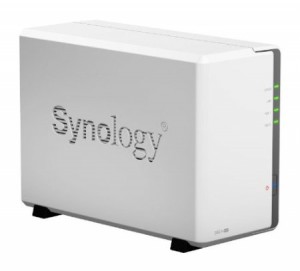
 Synology prides itself on delivering budget-friendly network storage solutions. Sure, they have some strong performers as well, but it is their value for money offerings that have secured them a fair bit of market share.
One of the latest additions to their stable is the Synology DS214se NAS 2-bay Diskstation, a successor to the DS213 model. The SE in the name indicates that this a stripped down version, keeping cost of entry exceptionally low but sacrificing some features and performance in the process.
Right off the bat we can tell you that, if you're on a tight budget and absolutely can't budge on it, the DS214se will be well worth a look. It's not going to knock your socks off with performance, but it can provide a real solution for basic, low-cost network storage if you're not planning on burdening it with too much challenging multi-tasking or CPU-intensive operations.
The Bundle
The specs of the DS214se are very modest, and so is the bundle. Still, you get everything you need to get up and running: a power adapter, a quick installation guide (paper, not disc), all the screws you need and an Ethernet cable.
Outside Design
The DS214se follows the design of previous Synology models, most closely matching the DS213j, if you're familiar with that model. It is mostly white with a dark grey vertical streak on the front that accommodates the power button and four green LEDs (STATUS, LAN, DISK 1, DISK 2). It looks functional and stylish.
At the back you have two USB 2.0 ports and a LAN port, as well as the power input and fan.
Inside the Synology DS214se NAS
The entire unit can be unclipped and opened for hard drive installation or for inspecting the core contents.
Inside you'll find the small motherboard, revealing a Marvell Gigabit Ethernet controller. An 800Mhz single core CPU will do the processing and there are 256MB of 1600mhz DDR3 memory to keep the speed going. You also get two SATA ports, of course.
Immediately we can appreciate how much Synology down-specced the SE edition. The standard DS214 features a dual-core 1066Mhz CPU, as opposed to the 800Mhz single core of the SE.
The SE also features only half the RAM of the standard DS214. This is definitely not going to be a blazing performer, but at least it's not pretending to be one. We can deduce that building RAID arrays may take a while, while resource intensive modules should probably be used with care.
Software
The DS214se runs on Synology's DiskStation Manager software. This is a fairly simple and effective user interface once you get used to it and offers all the functionality you need to manage your NAS.
What to Expect
This is a decent performer as long as you stay within its limits. You won't expect top performance at this price point and clearly somewhere some sacrifices will be evident.
However, looking at various performance tests for this unit, peak reading speeds of around 100MB/s and writing speeds reaching almost 60MB/s can be achieved, matching up to the manufacturer claims. This ends up being roughly 10% lower than the speeds you can expect from the previous budget Synology NAS, the DS213j.
On the Passmark read/write performance test, the DS214se provided comparable performance to models like the Iomega ix4-300d and Netgear ReadyNAS Duo V2. This is not a bad result.
Support for USB 3.0 would have been nice, as the included USB 2.0 ports mean that any externally attached drives would suffer from severely limited performance.
So, despite its low specs you don't need to expect snail-like performance from this budget beater. As long as you realize what it is capable of and don't throw more at it than it can handle, you can actually expect quite pleasing performance that matches that of somewhat more expensive NAS units.
Conclusion
The Synology DS214se is a great budget NAS that deserves your consideration. Performance is surprisingly solid for simple read/write operations, but the unit may struggle when tasked with more CPU-intensive operations.
The unit will be best utilized in a home network environment, or very small office. Supporting up to 8TB storage, you can populate this NAS with two large drives for plenty of storage. It can accommodate both 3.5" and 2.5" (with optional holder) hard drives.
Pros:
- Price
- Decent performance on simple tasks
- Quality design and manufacturing
Cons:
- Not for CPU-intensive tasks
- RAID takes longer to build
Leave a Reply