NAS Guide

Network Attached Storage News and Reviews

  • Best NAS
  • NAS Pro Blog
  • NAS Buying Guide
You are here: Home / Archives for Synology

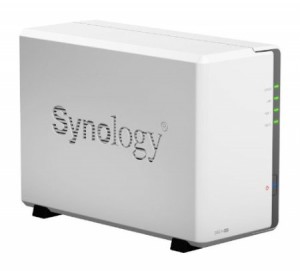
Synology DiskStation 2-Bay (Diskless) Network Attached Storage DS213 Review

November 18, 2013

DS213Over the years, Networked Attached Storage (NAS) has significantly evolved to contain the most important features of a conventional PC-based server. NAS is a computer data storage device that allows users to clear their server drive space and have access to their data quickly. Moreover, it also features a Redundant Storage Container that enables one or two hard drives to malfunction without the risk of data loss. Synology America Corp. is offering Synology DiskStation 2-Bay NAS DS213 that is specially designed to help users save time and money by providing them with print and file sharing features as well as remote access and centralized back up.

Who Could Buy/Benefit From This Product?

Synology DS213 is ideal for individuals who want to own a device that they can use to manage and set up data efficiently while making sure that such data are secured against possible threats and failures. This Network Attached Storage is also highly recommended to business owners who are looking for an effective tool that can help them ensure the smooth operation of their business. Through the use of this device, they can make sure that all their important company data will remain confidential and protected. The features of this product are designed to be used for both home and business setting.

Product Description

Synology DiskStation 2-Bay is a cost-effective NAS that has a 512MB Double Date Rate 3 (DDR3) Random Access Memory and a dual-core processing power that provides users with 104.41MB read speeds and 65.36MB write speeds. It also boasts the Synology DiskStation Manager (DSM) operating system that is known for its capability to give users a full set of applications that enhance the functionality of the device. This operating system is also easy to navigate and nicely designed. Aside from this, Synology NAS also features USB 3.0 support that offers speed that is 10 times better than USB 2.0.  This means that users will have less time transferring data and less power consumed for doing such activity.

Another essential feature of Synology DS213 is its encryption engine that works by improving the speed of DiskStation when transferring data by offloading the encryption calculation job away from the central CPU.  It can be customized to run on various applications including the ones that can be used for business operations, allowing business owners to meet their business needs. An honest Synology DS213 Review reveals how energy efficient this Network Attached Storage is. It has a smart airflow and 92mmx92mm fan that keeps the device cool 24/7. Furthermore, it is quieter than its PC counterparts due to its noise-dampening feature.

Product Features

  • With 512MB DDR3 Random Access Memory (RAM)
  • 10/100/1000M Ethernet LAN port
  • Powered by Synology DiskStation Manager (DSM)
  • With 1 SD Card port, 1 USB 2.0 port, and 2 USB 3.0 ports
  • With 8 terabyte (TB) maximum internal capacity
  • With 2.0 gigahertz (GHz) single core processor

Pros

One of the main benefits offered by Synology NAS is its excellent performance-price ratio. This device has optimal features of a high quality Network Attached Storage and is offered at a reasonable amount. It serves as an excellent tool for file and data sharing and the one that provides comprehensive office applications. Its built-in ports and SD card slot gives users the opportunity to transfer files and documents with ease.

Another essential benefit of Synology DS213 is that it consumes less power. With its hard drive hibernation, users can maximize the amount of power that the device saves. The hard drive can also be easily cleaned or replaced through the hot-swappable drives. This device is an effective backup solution. The use of Synology Time Backup package gives users the chance to restore or back up shared folders in various versions.

Cons

A Synology DS213 Review claims that some users have difficulty understanding some of the specs of the product, affecting their capability to set it up or install it. This problem can be solved by reading and understanding the Manual. Users can also call the Synology technical support for some assistance.

Customer Reviews and Scores

Synology NAS has already been reviewed by 178 Amazon reviewers. It has received an average rating of 4.4 stars out of 5. Of the 178 reviewers, 122 have rated this device with 5 stars and 38 rated it with 4 stars. There are also 8 Amazon customers who believe that it deserves a 3-star rating. This Synology review implies that the product has met the expectations of its users especially when it comes to functionality and quality.

Conclusion

Synology DiskStation 2-Bay Network Attached Storage DS213 is highly recommended to those who wish to have a Network Attached Storage device that has the characteristics and features of a good quality product. It is also cost and energy-efficient, enabling users to experience using an excellently engineered NAS without spending a significant amount of money.

 Check the price of the Synology DS213 on Amazon.
Related articles
  • The Best Home Network Storage Solutions
  • Synology wants you to check out its new software
  • Roll your own Synology DiskStation for NAS Do it Yourself
  • Synology DS214se Reviewed

Related posts:

  1. Synology America DiskStation 1-Bay Network Attached Storage (DS115J)
  2. Synology DiskStation DS213 Review
  3. Synology 2013 DiskStation DS213 and DS213+ Priced and Released
  4. Synology DiskStation DS213+ Review

Filed Under: Reviews, Synology Tagged With: Synology, Synology NAS

Synology DS214se Reviewed

November 12, 2013

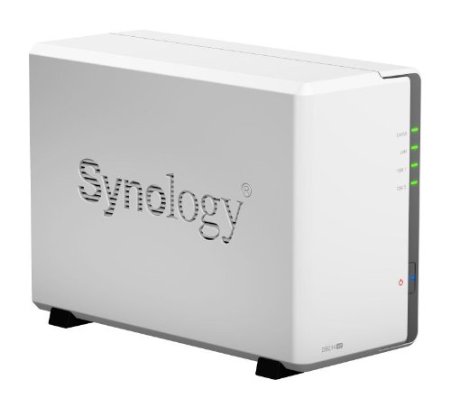
Synology America DiskStation 2-Bay Diskless Network Attached Storage (DS214se)Smallnetbuilder has reviewed the Synology DS214se two drive NAS. This is Synology's entrant in the small and inexpensive NAS category. Even though it runs only $160 or less, though, this NAS still features the full suite of the Diskstation Manager software. Synology does consider this a single purpose NAS, given its low CPU power and limited RAM, so it would probably be best not to try running too many applications on the NAS while trying to maintain high file throughput.

Speed was measured as good as long as the user is not logged into the desktop interface:

It turned out that we ran our tests with a browser logged into the Synology admin "desktop". Even with the System Health / Resource Monitor widget closed, there apparently is enough processor load to limit read throughput to the mid 80 MB/s range. So if you want top performance, stay out of the admin interface! That's what we did when we retested to post updated results that now reside in the NAS Charts.

http://www.smallnetbuilder.com/nas/nas-reviews/32259-synology-ds214se-reviewed?start=1

Overall, this is a good value budget NAS. Smallnetbuilder recommends you check out a couple of other NAS boxes if you are in the market for this category of NAS:

If your NAS needs are simple, the $160 Synology DS214se has all of the features you could want and enough performance for many SOHO users. But before you plunk down your money, be sure to check out the Zyxel NSA235 and Buffalo LS421DE and see if their more limited feature sets meet your needs.

http://www.smallnetbuilder.com/nas/nas-reviews/32259-synology-ds214se-reviewed?start=2

I'm not sure I would consider the Zyxel, though, because it does not have email or front panel notice when a hard drive is (or has) failed. This to me would be a no go for any NAS solution. I need to know when the Raid array is degraded without having to login to the user interface to find out.

Related articles
  • Synology unleashes its most affordable 2-bay NASever, the DS214se for $160
Quick Review of the new Synology 214se

Related posts:

  1. Synology Goes After the Low-End Market with the All-New DS214se
  2. Synology DS214se NAS Review
  3. Another Quick Review of the Synology DS214se
  4. Synology DS413 Reviewed

Filed Under: Synology Tagged With: NAS, Synology

Another Quick Review of the Synology DS214se

November 7, 2013

Synology America DiskStation 2-Bay Diskless Network Attached Storage (DS214se)There is a review of the new Synology DS214se over at micromart.co.uk. The reviewer does a quick run-through of the 2 drive NAS boxes specifications and capabilities. He concludes that performance is good but not great. And he worries that the lower power processor and RAM necessary for Synology to keep the price so low will cause problems for people who try to use the software that powers the NAS to do multiple jobs at once:

What concerns me is that it can be relatively easy to overload the more powerful Synology boxes with services, to the point that it's difficult to log into it. With the DS214se's 800MHz CPU you'll reach that saturation point much quicker.
Those things said, if you want Synology kit and previously it's been out of your budget, then this is your opportunity to experience the feature rich world it offers.

http://www.micromart.co.uk/storage/1492/synology-ds214se-nas-box-review

Related articles
  • Synology DS214Se 'Special Edition' 2-bay NAS Review

Related posts:

  1. Synology DS214se NAS Review
  2. Synology DS214se Reviewed
  3. Synology Goes After the Low-End Market with the All-New DS214se
  4. Synology DiskStation DS213 Review

Filed Under: Synology Tagged With: Synology

“I think I might be cursed” thread – Too Many Hard Drive Failures

November 5, 2013

A thread over at http://ask.metafilter.com/251359/I-think-i-might-be-cursed discusses what to do after too many drive failures.  There are quite a few good posts which lead to the conclusion that Synology is the way to go.

The discussion also deals with Raid 1 versus Raid 5. In fact, reading that thread led me to do the analysis in my recent post "Raid 1 vs Raid 5 Cost Comparison." This post was what got me thinking:

Three WD Reds ($300): two for a RAID1 setup, one for external off-site backup.
Synology NAS, HP Proliant microserver NAS, etc. ($250 - $400), or something similar.
Garden-variety small UPS with a USB status port ($50).
Gigabit ethernet switch ($30).

RAID5 for most home folks isn't a good investment when compared to RAID1 unless you're enclosure-limited, etc. As you've noted, there's no added redundancy, just better storage utilization; compare the cost of three N-sized drives to two N*1.5-sized drives. (3 x 2TB == $330, 2 x 3TB == $270) Factor in the off-site drive's usability as a hardware-identical hot swap (once you replace it with a drive from your local computer store, of course) and RAID1 only looks better.

http://ask.metafilter.com/251359/I-think-i-might-be-cursed#3650878


Related articles
  • Yet Another Help Me Find the Right NAS Forum Thread

Related posts:

  1. Help Me Choose a NAS Forum Thread
  2. UnRaid vs FreeNAS Discussion Thread
  3. Raid 1 vs Raid 5 Cost Comparison
  4. FlexRAID Forum Threads

Filed Under: Raid 1 vs Raid 5 Tagged With: Hard disk drive, Network-attached storage, Storage, Synology

Raid 1 vs Raid 5 Cost Comparison

November 5, 2013

I did a cost comparison using current prices on Amazon to see what the difference in price is between a 4 bay NAS using two Raid 1 volumes and one Raid 5 volume. As you can see, going with Raid 1 arrays means about a 30% premium per terebyte.

These costs do not take into account the cost of the NAS enclosure itself which should add around $360 for the least expensive 4-bay Synology NAS.


Related:

WD Red 3TB NAS Hard Drive Review

Related posts:

  1. Another Western Digital Red NAS Hard Drive Review
  2. Western Digital Red vs Green Drives for a NAS (if no RAID)
  3. Low Cost NAS Boxes and Performance over Time
  4. “I think I might be cursed” thread – Too Many Hard Drive Failures

Filed Under: Raid 1 vs Raid 5 Tagged With: Hard disk drive, NAS, Standard RAID levels, Synology

Synology Goes After the Low-End Market with the All-New DS214se

November 5, 2013

Synology seems intent on grabbing the low-end part of the NAS market. It has introduced the low priced (MSRP around $160) DS214se two bay NAS. The NAS runs the full DSM software, but it obviously is lower in power and RAM running a single core 800 MHz processor with 256 GB of DDR3 RAM.

Synology claims that the new NAS will still achieve speeds when reading that will support multiple HD video streams:

Centering on the core features of NAS devices, Synology DS214se provides handy and effective network storage under budget. Not only does DS214se centralize and back up your digital contents, it makes cross-platform and cross-device sharing effortless. DS214se delivers an average over 58 MB/sec writing speed under RAID 1 configuration in a Windows® environment, and over 102 MB/sec reading.1 The built-in floating-point unit enhances the overall capability of the main CPU, and is particularly advantageous in speeding up thumbnail processing, making photo viewing a refreshingly new experience. Equipped with Synology’s full multimedia applications, DS214se is also an ideal solution for users looking for entertainment and download center, providing easy and energy-efficient download service as well as multimedia streaming capabilities. With Synology’s rich cloud applications, DS214se serves as your personal cloud whose content is available anywhere on demand.

http://www.synology.com/products/product.php?product_name=DS214se&lang=us#p_submenu


Related articles
  • Synology unleashes its most affordable 2-bay NAS ever, the DS214se for $160

Related posts:

  1. Synology DS214se Reviewed
  2. Another Quick Review of the Synology DS214se
  3. Synology DS214se NAS Review
  4. Synology Releases the One Bay DS112+ NAS

Filed Under: Synology Tagged With: NAS, Synology

Yet Another Help Me Find the Right NAS Forum Thread

November 3, 2013

Another of the threads where people are helping others find the right NAS for their needs is over at http://arstechnica.com/civis/viewtopic.php?f=11&t=1223281#p25610075. This thread has some good discussion of Synology vs QNAP vs Drobo. A particularly interesting post is this one where the writer compares two different Synology NAS devices and states exactly what the "j" means in several Synology product names:

I have two Synologies (a DS411+II and a DS211j), and I love both of them. One caveat is that the "j" tacked onto the model number usually designates a lower power processor and smaller amount of RAM which could affect the performance of any apps you might install. Network throughput shouldn't be an issue though. Case in point my DS211j comes with 512MB of RAM and a Marvell processor, IIRC. The DS411+II is an Intel proc with 1GB of RAM. The 411 can run any of the installed apps pretty well while some will bog down the 211j, e.g. running nzbget and unpacking rar files, and sometimes slow down the interface. I've had the 211j for a couple of years now, and I've been very happy with it. I grabbed the 411 last year and have had no issue with it at all, other than the fact that I'm running out of space.

http://arstechnica.com/civis/viewtopic.php?f=11&t=1223281#p25610075

The "j" designation in Synology NAS boxes indicates that the model has a lower power CPU and less RAM than the other NAS with the same number.

Related articles
  • The Best Home Network Storage Solutions
Synology DSM 5.0 Beta

Related posts:

  1. Help Me Choose a NAS Forum Thread
  2. Getting Started With a NAS
  3. DS211 Synology
  4. Synology DS1512+ Problems Reported

Filed Under: Choose a NAS Tagged With: Drobo, QNAP, Synology, Synology NAS

Help Me Choose a NAS Forum Thread

November 2, 2013

I found another forum thread about choosing a NAS - this one over at stereo.net.au. The thread started almost a year ago, but still is receiving new posts. A sample post:

I currently own a Synology DS212j, which recently replaced a Netgear ReadyNAS duo.

Pros
Synology is, in my opinion, way better. Faster network performance. I could never reliably stream anything from the ReadyNAS, so it ended up just being a backup repository while I played music from a USB Drive attached directly to my PC.

Synology allows me to stream audio (and video) direct from the NAS. I don't use the built in streaming server in the Synology due to some issues with earlier versions. I use Jriver Media Centre.

Built in Torrent client in the Synology (If you are interested) is much nicer. With the ReadyNAS, the torrent client was...ummm... shall we say...basic. download the torrent file, then log into the ReadyNAS and locate the downloaded file and then the download starts. Also, the torrent client in the Synology is much better presented.

With the Synology, Map the Torrents folder on your PC ( A one off activity). Once this is done, you can simply download torrent files directly to the mapped folder and the Synology automatically starts the torrent download....easy!

The web interface for the synology is a pleasure to use. Nicely laid out and responsive.

Finally, the Synology is waaaayyy quieter than the ReadyNAS ever was.... You'd hardly know it was on when standing next to it.

Cons

Construction quality - ReadyNAS was much more sturdy feeling. Case was primarily Steel and felt well built. Synology is mostly plastic.

Hope this helps. Can't comment on any other brands because I've never used anything else....

http://www.stereo.net.au/forums/index.php?/topic/47086-nas-recommendation/

I like these kinds of posts since they relate experience of real users in the real world and are not just tests that are done in a few hours. Of course, Synology is my brand of choice also.

Related posts:

  1. Yet Another Help Me Find the Right NAS Forum Thread
  2. UnRaid vs FreeNAS Discussion Thread
  3. Zyxel NSA325 vs ReadyNAS Duo v2 Thread
  4. “I think I might be cursed” thread – Too Many Hard Drive Failures

Filed Under: Choose a NAS Tagged With: Backup, NAS, Synology

« Previous Page
Next Page »

Get Posts By Email

Delivered by FeedBurner

Recent Posts

  • WD My Cloud 4TB Personal Cloud Storage
  • Synology America DiskStation 1-Bay Network Attached Storage (DS115J)
  • QNAP TS-451 4-Bay Personal Cloud NAS Overview
  • QNAP TS-431 4-Bay NAS
  • WD Green vs Red Drives

NAS Pro

  • NAS Pro Home
  • Network Attached Storage Buying Guide
  • NAS Pro Blog

Categories

  • 4-Bay NAS
  • Akitio NAS
  • Amahi
  • Asustor
  • Backup
  • Best NAS
    • Best NAS 2014
  • Buffalo TeraStation
  • Build a NAS
  • Build or Buy a NAS
  • Choose a NAS
  • Cloud Storage
  • D-Link NAS
  • Drobo
  • FlexRAID
  • FreeNAS
  • Guides
  • Hard Drives
  • HP Microserver
  • Iomega
  • iSCSI
  • LaCie
  • NAS
  • NAS4Free
  • Netgear
  • Openmediavault
  • Pogoplug
  • QNAP
  • Raid 1 vs Raid 5
  • Reviews
  • Seagate
  • Shuttle NAS
  • Synology
  • Terra Master
  • Thecus NAS
  • Turnkey Linux NAS
  • Ubuntu Server
  • unRAID
  • Western Digital Hard Drives
  • Western Digital NAS
  • Windows 8
  • Windows Home Server
  • Windows Home Server 2011
  • ZFS File System
  • Zyxel

Tags

Amahi Backup BSD Build a NAS CrashPlan DiskStation Drobo Drobo Mini DS1512+ DSM FlexRAID FreeBSD FreeNAS Gigabit Ethernet Hard disk drive Intel Atom Iomega Linux Media Server Microsoft Windows NAS NAS Reviews Netgear Network-attached storage Openmediavault Plex QNAP QNAP NAS RAID Reviews Seagate Synology Synology NAS Thecus Thecus NAS Ubuntu Unraid USB USB 3.0 Western Digital Windows 8 Windows Home Server Windows Home Server 2011 XBMC ZFS

Home    Privacy Policy    Contact Us    Earnings Disclosure    Sitemap   
Copyright © 2008-2015, NAS Guide, All Rights Reserved
NAS Guide
MENU
  • Best NAS
  • NAS Pro Blog
  • NAS Buying Guide